Microsoft Office 2024 Professional Plus for Windows or Standard for Mac with Bitdefender Antivirus, 1 Year (Up to 87% Off)
What Customers Loved
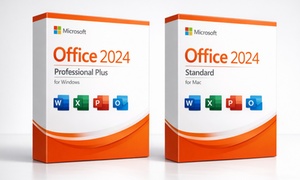
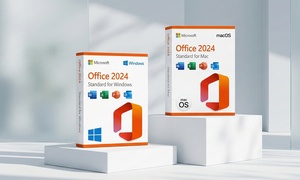
Microsoft Office 2024 Professional Plus for Windows or Standard for Mac is a one-time purchase bundled with a year of Bitdefender antivirus.
- Genuine Product Key
- Email Delivery
- Secure Checkout
Get a one-time purchase Office 2024 product key bundled with a year of Bitdefender antivirus. Pick the Windows pairing or the Mac pairing. Redeem your voucher on our redemption page and both product keys are emailed straight to you.
What You Get
- Windows bundle: Office 2024 Professional Plus + Bitdefender Antivirus Plus (1 PC, 1 year).
- Mac bundle: Office 2024 Standard for Mac + Bitdefender Antivirus for Mac (1 year).
- Office 2024 is a one-time purchase with no subscription and no annual renewal. Installs locally and runs fully offline.
- Receive product keys for both Office 2024 and Bitdefender via email within 1–2 hours of voucher redemption.
Software Overview
Choose the bundle that matches your platform. The Windows pairing includes Office 2024 Professional Plus with the full desktop suite plus Access, paired with Bitdefender Antivirus Plus. The Mac pairing includes Office 2024 Standard for Mac with the core suite, paired with Bitdefender Antivirus for Mac.
| Included | Windows Bundle | Mac Bundle |
|---|---|---|
| Word | Included | Included |
| Excel | Included | Included |
| PowerPoint | Included | Included |
| Outlook | Included | Included |
| OneNote | Included | Included |
| Access | Included | – |
| Local installation (runs offline) | Included | Included |
| Bitdefender antivirus (1 year) | Antivirus Plus | Antivirus for Mac |
Bitdefender Features
System Requirements
Windows Bundle Requirements
OS: Windows 10 or Windows 11
Processor: 1.6 GHz or faster, 2-core
Memory: 4 GB RAM
Storage: 4 GB available disk space
Other: Internet connection required for download and activation
Mac Bundle Requirements
OS: One of the three most recent versions of macOS
Memory: 4 GB RAM
Storage: 10 GB available disk space
Other: Internet connection required for download and activation
Product Key Purchase: Each product key is for one-time activation on one device. Use on multiple devices is not allowed. Refer to Microsoft’s Terms of Use and Privacy Policy for specific license details.
How It Works
- Get Your Voucher
Locate your Groupon voucher code after purchase.
- Redeem Online
Visit the redemption page, enter your name, email address, and Groupon code, then submit the form.
- Receive Product Keys
Your Office 2024 and Bitdefender keys are emailed within 1–2 hours. Check your spam or junk folder if they don't arrive. A Gmail address is recommended for the fastest delivery.
- Activate Office 2024 (Windows)
Download the installer supplied with your order, run it, then open Word or Excel and go to File > Account > Change product key. Enter your 25-character key and click Activate. Note: Professional Plus keys are not redeemable at setup.office.com.
- Activate Office 2024 (Mac)
Download the installer supplied with your order, run it, then open Word and follow the activation prompt. Note: Standard for Mac keys are not redeemable at setup.office.com.
- Activate Bitdefender
Go to Bitdefender Central, sign in or create an account, click "My Subscriptions," then "+ Activate with code," enter your key, and click Activate. Then click "Install Bitdefender," run the installer, and sign in.
Need assistance?
For any issues or if the order doesn't arrive within 24 hours, please contact: [email protected]
Your product keys cannot be issued until the voucher is redeemed.
- Vouchers must be redeemed on our redemption page to receive your product keys
- Product keys are delivered by email once the voucher has been redeemed
- Digital delivery — no physical product will be shipped
- Internet connection required for download, activation and updates
- Product keys are non-transferable once activated
- One voucher covers both products; each product key is activated separately
- No refunds once product keys have been delivered or activated
The Office 2024 Professional Plus product key is a one-time purchase covering 1 Windows PC
- Includes Word, Excel, PowerPoint, Outlook, OneNote and Access
- Windows only — not compatible with macOS
- Does not include Microsoft 365 cloud services or OneDrive storage
- Does not receive new feature updates
The Office 2024 Standard for Mac product key is a one-time purchase covering 1 Mac
- Includes Word, Excel, PowerPoint, Outlook and OneNote
- macOS only — not compatible with Windows
- Does not include Microsoft 365 cloud services or OneDrive storage
- Bitdefender Antivirus Plus covers 1 Windows PC for 1 year from activation
- Requires a free Bitdefender Central account
- Includes VPN with limited daily traffic (200 MB/day)
- Bitdefender Antivirus for Mac covers 1 Mac for 1 year from activation
- Requires a free Bitdefender Central account
- Includes VPN with limited daily traffic (200 MB/day)
- Each option pairs the Office edition with the matching Bitdefender edition for that platform
Yes. Office 2024 in this deal is a one-time purchase with no subscription and no annual renewal. The bundled Bitdefender antivirus runs for 1 year.
Yes. Both the Windows and the Mac bundle include Word, Excel, PowerPoint, Outlook and OneNote. Access is included in the Windows bundle only.
Publisher is not among the listed apps. The Windows bundle lists Word, Excel, PowerPoint, Outlook, OneNote and Access.
Yes. The Windows bundle lists Windows 10 or Windows 11, a 1.6 GHz 2-core processor, 4 GB of RAM and 4 GB of disk space as requirements.
Redeem your voucher on the redemption page, then wait 1 to 2 hours for the emailed keys. On Windows, open Word or Excel, go to File > Account > Change product key and enter the key.
Yes. The Mac bundle is Office 2024 Standard for Mac plus Bitdefender Antivirus for Mac for 1 year, for one Mac running a recent macOS.
No. The fine print says product keys are non-transferable once activated, and each key covers one Windows PC or one Mac.