75%
5%
2%
1%
17%
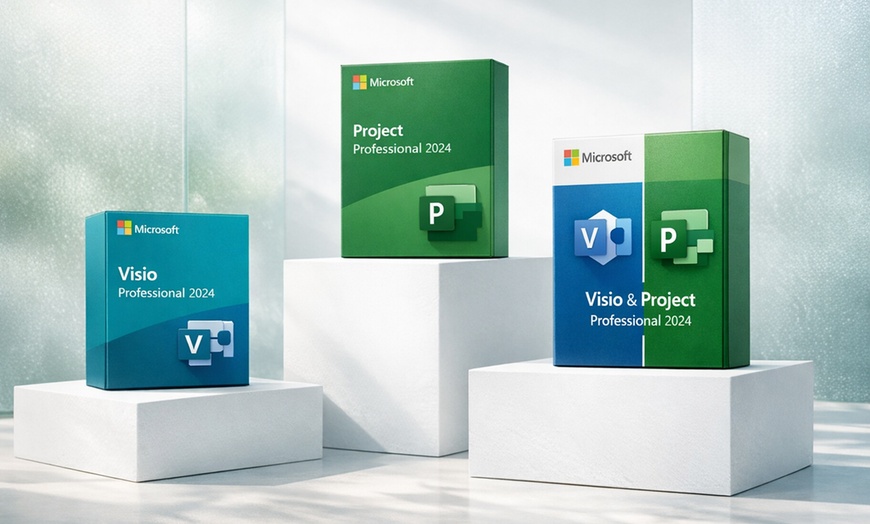
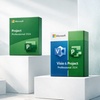
From data visualization to project management, Visio Pro 2024 and Project Professional 2024 provide the complete toolkit for professional success. Get the best learning with a steep discount!
Microsoft Visio Pro 2024 and Project Professional 2024 are the two industry-standard tools that enterprise teams rely on for professional diagramming and project management — now available as lifetime product keys at up to 53% off MSRP. Choose the app you need, or grab the bundle and get both on one PC.
Visio Professional 2024 is the go-to software for flowcharts, org charts, network diagrams, floor plans, and BPMN process maps. Project Professional 2024 gives you full project scheduling power — Gantt charts, resource allocation, timeline views, and sync with Project Online & Server. Both are Windows-only perpetual product keys: activate once, own forever, no subscription.
Product Key Purchase: You are purchasing a product key here, not a license. According to the Microsoft license terms, this product key is for one-time activation only. Key functionality may not be guaranteed if the device is modified or reinstalled. Use on multiple devices is not allowed. Refer to Microsoft’s Terms of Use and Privacy Policy for specific license details.
The industry standard for creating professional diagrams on Windows. Visio Pro 2024 supports every major diagram type used by IT, engineering, architecture, and business teams.
The full-featured project management desktop app trusted by PMOs and project managers worldwide. Project Pro 2024 gives you the scheduling power of enterprise software without the enterprise price tag.
Get Visio Pro 2024 and Project Pro 2024 on the same Windows PC for $119.90 — saving $19.90 versus buying separately. Both apps activate with individual keys and run independently. Best value for consultants, department leads, and IT managers who need both diagramming and project scheduling in their daily workflow.
System Requirements:
After purchase, go into My Stuff and find the Redemption Code under the coupon barcode. The Groupon Redemption Code is a voucher and not the software key.
Check both your inbox and spam folder for delivery updates within 2 hours.
Download from Microsoft.com using your key. Activation is online and takes under 5 minutes.
<div style="display:flex;flex-wrap:wrap;gap:16px;margin:24px 0 8px">
  <div style="flex:1 1 calc(50% - 8px);min-width:260px;background:#fff;border:1px solid #e0e0e0;border-radius:12px;padding:20px;box-sizing:border-box">
    <div style="color:#f59e0b;font-size:18px;margin-bottom:8px">★★★★★</div>
    <p style="margin: 0.75em 0; font-style: italic; font-size: 14px; line-height: 1.6; color: #333; margin-bottom: 12px;">“The best thing is they have real tech support, not a bot. Really helps if you need some support.”</p>
    <div>Tech Professional — Groupon Verified</div>
    <div style="display:inline-block;background:#e8f5e0;color:#0a6e23;font-size:11px;font-weight:700;padding:3px 10px;border-radius:20px">Human Support</div>
  </div>
  <div style="flex:1 1 calc(50% - 8px);min-width:260px;background:#fff;border:1px solid #e0e0e0;border-radius:12px;padding:20px;box-sizing:border-box">
    <div style="color:#f59e0b;font-size:18px;margin-bottom:8px">★★★★★</div>
    <p style="margin: 0.75em 0; font-style: italic; font-size: 14px; line-height: 1.6; color: #333; margin-bottom: 12px;">“Just purchased Microsoft Visio Pro — the experience working with David was great. Highly recommend.”</p>
    <div>Verified Buyer — Groupon Verified</div>
    <div style="display:inline-block;background:#e8f5e0;color:#0a6e23;font-size:11px;font-weight:700;padding:3px 10px;border-radius:20px">Great Service</div>
  </div>
  <div style="flex:1 1 calc(50% - 8px);min-width:260px;background:#fff;border:1px solid #e0e0e0;border-radius:12px;padding:20px;box-sizing:border-box">
    <div style="color:#f59e0b;font-size:18px;margin-bottom:8px">★★★★★</div>
    <p style="margin: 0.75em 0; font-style: italic; font-size: 14px; line-height: 1.6; color: #333; margin-bottom: 12px;">“Great value and excellent customer service. Issue with the product key was resolved immediately.”</p>
    <div>Groupon Verified Buyer</div>
    <div style="display:inline-block;background:#e8f5e0;color:#0a6e23;font-size:11px;font-weight:700;padding:3px 10px;border-radius:20px">Issue Resolved Fast</div>
  </div>
  <div style="flex:1 1 calc(50% - 8px);min-width:260px;background:#fff;border:1px solid #e0e0e0;border-radius:12px;padding:20px;box-sizing:border-box">
    <div style="color:#f59e0b;font-size:18px;margin-bottom:8px">★★★★★</div>
    <p style="margin: 0.75em 0; font-style: italic; font-size: 14px; line-height: 1.6; color: #333; margin-bottom: 12px;">“Very smooth process — the bundle value made it more than worthwhile. Long-time corporate Microsoft user and very impressed.”</p>
    <div>Groupon Verified Buyer</div>
    <div style="display:inline-block;background:#e8f5e0;color:#0a6e23;font-size:11px;font-weight:700;padding:3px 10px;border-radius:20px">Bundle Value</div>
  </div>
</div>


Error submitting request
Thank you for your response


